Monthly Archives: July 2015

yoga 14 screen

Lenovo ThinkPad Yoga 14 review: a twist of Wacom ES

Lenovo ThinkPad Yoga 14 Review

by Tablets for Artists

Update, Spring 2016: There is a newer version, the 20FY0002US.  I have written a separate review of it you can read here. Click to see it at Amazon. This newer one doesn’t have the battery issues some of the units from the earlier model did, and this one comes with the Wacom ES pen in a silo in the body. Recommended.
icon

Type of Tablet

Convertible Tablet PC (Laptop that turns into a tablet via a hinge. Keyboard is not detachable).

The rumored 15″ version that works with the pen never happened.

UPDATE: This computer in Windows 10 is now available at Best Buy.

NOTE: There are several versions of the Yoga ThinkPad 14 and some do not have the Wacom digitizer. The ones that do are: the 20DM008UUS, which has Windows 8.1, and the 20DM009GUS with Windows 10. It is confusing, the salespeople aren’t informed, and the info doesn’t appear in the product info. 
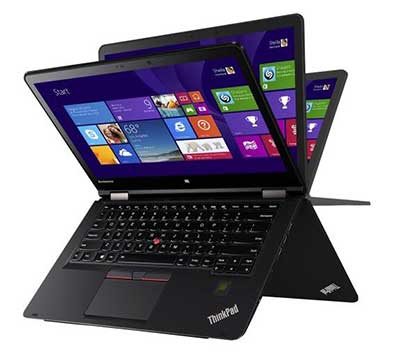
lenovo thinkpad yoga 14 review

Lenovo ThinkPad Yoga 14


Overview

The computer, made of magnesium alloy with a plastic keyboard, is solid and good-looking, as well as slim. The display is bright and clear with deep colors. The hinge works well in all the positions. The trackpad is large and responds well. The extra screen space is a great addition for drawing. The ThinkPad Yoga 12 weighed 3.5 lbs., and the 14 weighs in at 4.2 lbs. The 12 actually had a brighter screen at 324 nits, but to me it did not look as bright, maybe because the 14 has a smudge-and-fingerprint-resistant coating that adds to the glossy sheen, whereas the 12 was matte. Glossy as it is, the surface is not too slippery for drawing, though I prefer drawing on the matte. So there is a tradeoff here between brightness and texture.

It boots up and shuts down quickly. Programs open quickly, too. There is just a single slot of RAM, and the 8GB is not expandable. But 8GB is plenty to run Adobe CC and other graphics programs. Bootup and shutdown are quick.

thinkpad yoga 14 opens flat

The Yoga 14 can open to a flat position, so you could draw on it like this and keep access to the keyboard.
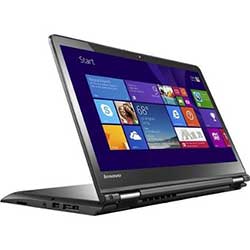
lenovoyoga14tabletmode

Or you can push the screen down so it’s flat, with the keyboard on the bottom. Keys will be locked, so it’s helpful to use an external keyboard to access keyboard shortcuts.


Features

IPS display with 10-point multitouch, screen size 14″
Screen resolution 1920 x 1080 (Full HD)
brightness: 267 nits
1 TB hybrid hard drive with 16GB solid state drive
360-degree design to fold into 5 settings: laptop, tablet, tent, table, stand
Intel 4th Generation Core i5-4210U processor
8 GB RAM, non-expandable, soldered in (possibly could be expanded with some difficulty)
NVIDIA GeForce GTX 840M graphics that will switch on automatically when you open a program that uses it (or you can change options in the NVIDIA settings)
720p Webcam
keys that retract when in tablet mode
backlit keyboard (user turns on backlighting when wanted)
Dolby Home Theater audio

Height: 0.8″
Width: 13.3″
Depth: 9.4”
Weight: 4.2 lbs.

3 USB ports: two 3.0 and one 2.0
No Ethernet port
1 full HDMI output

What’s in the Box

Thinkpad Yoga 14 2-in-1 14″ Touch-Screen Laptop
4-cell lithium-polymer battery
Power cord, AC adapter
Owner’s manual

Durability

The Lenovo Thinkpad Yoga 14 has military-grade protection for shock, vibration, sand and dust. The computer is solid and should be a brawny travel companion.

Portability

The PC’s weight, while light for its size, it’s a lot to tote around for long periods of time.

Wacom ES Digitizer

The 14 uses Wacom ES, which is sort of like a marriage between Wacom EMR and N-trig. The pen takes batteries. The ThinkPad Yoga 12 uses traditional Wacom EMR technology, so you could use a regular Wacom pen such as the type you use for the original Surface Pro and Surface Pro 2, and attain 1,024 levels of pressure sensitivity. You cannot use that kind of pen with the 14.

Wacom ES feels somewhere in between N-trig and traditional Wacom EMR. It has the 2,048 levels of pressure sensitivity of Wacom, with the better edge accuracy of N-trig. It’s the same tech used in the Toshiba Encore 2 Write. (That does not mean that all the pens will work on all of them.) The drawing/painting experience won’t be quite as fluid as Wacom EMR, but it requires less initial activation force (amount you have to press down to get a mark) than the Surface Pro 3, which is N-Trig, so you won’t have to worry about having to press hard. ES (also called AES) tends to have a lower hover distance.

If you go to see this computer and want to see that it actually has Wacom, simply type the word Wacom into the Windows search box and the Wacom settings will pop up in the search results.

Pen

To get pressure sensitivity, you must use the ThinkPad Active Capacitive Pen, also called the Lenovo ThinkPad Pen Pro. (Since this is multitouch, you can use any old capacitive stylus–such as for the iPad–on this, but with no pressure sensitivity).

thinkpad active capacitive-pen

Here’s the pen on Amazon.

The pen takes an AAAA battery. It has two programmable buttons. It also has a holder that attaches to the laptop via a USB port.

On Amazon and other sites, there is something called the Lenovo ThinkPad Active Digitizer Pen. Do not buy that. That is a traditional Wacom pen and will work on the ThinkPad Yoga 12 2-in 1, but not on the 14. The name is very confusing. To make things even more confusing, there is an earlier version of the 14 that has no active digitizer. So be sure you are getting this 2nd-generation model. There is also a Yoga 15 without the digitizer. Best Buy and Lenovo are not much help with providing info on what pen goes with what. The Lenovo Web site contains very little info. Lenovo’s Helix pens will also not work on the ThinkPad Yoga 14.

Drawing on the ThinkPad Yoga 14

Wacom ES is not too big of a compromise from traditional Wacom. If you’d rather have an all-in-one than a Cintiq13, and a Cintiq Companion isn’t affordable or what you want, and you want something larger than most options, this is a reasonable choice as far as drawing.  The 8GB of RAM lets you easily multitask and use Adobe Photoshop and all the CC programs. In Photoshop CC, you can select to run the NVIDIA dedicated graphics GPU (watch the video below)–actually, it will go on by itself but some people choose to control the settings more.

The Lenovo’s screen is bright, and images look crisp. Using keyboard shortcuts on the Yoga 14 is tricky because the keys retract once out of laptop mode so you’d have to unfold the tablet or use the on-screen keyboard, or, better, use a Bluetooth keyboard. In Photoshop CC, you can create Photoshop Actions to avoid keyboard commands.


https://www.youtube.com/watch?v=_8eUW6N2wK8

Watch this video to see a drawing demonstration, and see how to run the dedicated NVidia graphics GPU in Photoshop CC for better performance.

As far as typing, the keyboard is comfortable and well-made, and the ThinkPad little red button nested in the keys can be used as a pointer. The trackpad is large and has buttons on it than can be used as selection and right-click tools.

Screen

The 1080 IPS High Definition screen is bright and cheery with excellent viewing angles, good contrast and a smudge-and-fingerprint antiglare coating. It’s glossy, but not too slippery to draw on. The colors are rich and contrast is deep.

The Dolby sound can get very loud, but it has a bit of tinniness.

As you can see, the screen is pretty glossy and bright. Photodon.com has screen protectors especially made for this computer. You can try one that’s not too matte, such as the 25% anti-glare one, to preserve image sharpness.

Here you can verify that it has a Wacom driver–when in doubt, just type Wacom into the search box.

yoga 14 screen

Battery life

around 6.5 hours

The battery life is a good 90 mins. less than the ThinkPad Yoga 12s.

Battery issues

There are serious concerns with the battery beyond that it doesn’t last a full workday. Many users had battery problems, causing inconsistent brightness, power drain, and random shutdowns. The Lenovo forums contain a long thread by stressed-out users. One person figured out the issue and the fix, but it’s not something everyone can do themselves, plus the method may void the warranty. These complaints are not showing up a lot in the Lenovo Yoga ThinkPad 14 reviews so far, so I don’t think this is incredibly widespread, but it’s hard to say because the release of this model is relatively recent as of this writing. Lenovo is aware of it and perhaps they will do something about it. We will follow the issue and add updates. A couple of commenters here and elsewhere have said that they got ones with no problems and really like them. Still, pay close attention to any return policies.

Tip: disable adaptive brightness and power management to get more consistent brightness.


Pros

fast processor
dedicated graphics
2,048 levels of pressure sensitivity with pen
great display
nice keyboard
large screen

Cons

glossiness of screen not ideal for drawing
have to buy pen separately, lack of information from dealers
not as fluid as traditional Wacom
battery life of 6.5 hours relatively short
weight of 4.2 lbs. hefty to carry
risk of getting one with bad battery


User reviews

Many people are really happy with the Yoga 14 because it’s fast, the pressure sensitivity works well, and it can run Photoshop and other programs breezily. One Lenovo ThinkPad Yoga 14 review described it as “amazing.”

This is it in tent “pose”:

<lenovoyoga14review2


The Verdict

This laptop is a very good choice for an artist, if you get one without the battery issues. So it’s hard to give a clear recommendation in this Lenovo ThinkPad Yoga 14 review, because as an art tablet it’s pretty great, so it gets a qualified “Namaste” (recommendation). If you feel life’s about taking risks, it may be worth it. The ThinkPad Yoga 12 (also called the ThinkPad Yoga 2 in 1) has a smaller, 12.5″ screen, but these battery issues haven’t been reported and it has traditional Wacom. As far as the 14, the price is great for the features it offers.

NEWER VERSION WITH WINDOWS 10
BUY ON AMAZON — The one for sale on Amazon is model 20DM000VUS, which is the Windows 8.1 version. You can easily upgrade for free to Windows 10. As with all the models of this computer, it does not come with the pen, you have to order the pen from the link right below.
See more info/buy the Lenovo Active Capacitive Pen here (Lenovo).
Read our review of the ThinkPad Yoga 2-in-1 (ThinkPad Yoga 12)
See the ThinkPad Yoga 12 on Amazon (same as ThinkPad Yoga 2 in 1. The 12 is an informal name to distinguish it from the 14).
 The Yoga 14 works with Lenovo’s OneLink and OneLink Pro docks.
lenovothinkpaddock


Lenovo ThinkPad One Link Pro Dock (pictured) (Amazon)

Lenovo ThinkPad Pro Dock


end of Lenovo ThinkPad Yoga 14 review

Read review of the newer version of the TP Yoga 14.
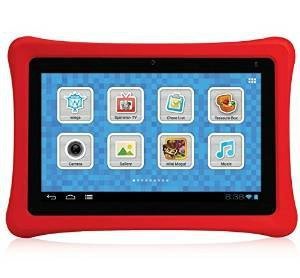
 

nabi 2s review

nabi 2S review

nabi 2S Review


best tablets for kids


See the nabi 2S  and other nabi reviews on Amazon 

nabi 2S vs. nabi 2

The nabi 2S is Southern California-based Fuhu’s newer version of the nabi 2. It now has twice as much memory (16 GB instead of 8), a better display (1280 x 800 pixels vs 1024 x 600), upgraded Wi-fi and Bluetooth networking capabilities, a more durable charger, and a longer-lasting battery. It’s a big improvement over an already popular kids’ tablet.

The display on the nabi 2S is much sharper than on the nabi 2. Images look crisp. On the downside, it doesn’t have a mini HDMI port, and the 2 did. However, the 2S works well with Google Chromecast.

Because of its speed, content, and parental controls, the nabi 2S is one of the top tablets for kids in its class. Many nabi reviews have praised this model.

Type of Tablet

Children’s tablet, Android

Age group

pre-K to 8

What’s in the box

nabi 2S tablet
Drop-safe Bumper
Power adapter (100-240V)
proprietary nabi connector to USB Cable
Product info
Quick start guide
nabi cares Card

The bumper on the nabi 2S, like the 2, is made of non-toxic, food-grade silicone. The bumpers are removable and come in many colors, including glow-in-the-dark.

Features

Dual mode: nabi kid-friendly nabi Mode and Parent mode
Screen: 7-inch with Multi-Touch (Capacitive)
Resolution 1280 x 800 pixels
NVIDIA Tegra 3 Mobile Processor with Quad-Core CPU
16GB, expandable via MicroSD (up to 32GB)
1GB RAM
2MP front-facing camera
Takes photos and shoots 720p Video
plastic body
headphone jack
runs on Android KitKat with Blue Morpho, a nabi overlay to the Android OS

Dimensions

Width: 8.69 Inches (220.8 mm)
Height: 6.05 Inches (153.7 mm)
Depth: 1.14 Inches (29.08 mm)
Weight: 1.31 Pounds (596 g)
These sizes and weights include the bumper.

Durability

The bumper protects very well even after many, many drops.

ince it isn’t fused to the nabi (allowing you to take it off and change it to the various colors of bumper that nabi sells) it does not protect the nabi from liquid spills.


https://youtu.be/aHsH8P1HT9I


Dual Mode – Parental Controls

The nabi sports two modes, nabi mode, which is kid-safe, and Parent Mode, which is a standard Android mode. These modes are already set up and ready to go as soon as you turn on the tablet for the first time. Parents can allow or block apps, create customized channels for kids, set automatic time limits for tablet use, create a Chore list and dole out nabi “Coins” for completing them, set rules for individual apps, and create ways for children to earn extra tablet time.

You can make multiple profiles for more than one child.

The kids’ apps include kid-safe sharing and messaging app called nabi Konnect. Skype can be used only in Parent Mode. The nabi Coins are for sale in the nabi store and can be used to buy kid-friendly content from the nabi Treasure Chest.

Content

The proprietary Wings Learning System features reading, writing, social studies, math, and an “iStorytime” app, for pre-K through third grade. It adapts to your child’s levels of proficiency.  It’s designed to build skills and confidence, and ties in with Common Core. The Wings N-sight feature delivers reports on how well your child is doing and recommends areas to improve. It’s accessible in the dashboard. There’s also content from educational providers such as MeeGenius.

The apps provide a personalized, adaptive way of learning,  meaning the content adjusts to the child’s proficiency level. The system includes videos made by classroom teachers. Wings can supplement school learning. Wings Challenge, a gamified way of delivering educational content, has over 16,000 lessons and 300,000 questions. Fuhu says the system supplements school learning and helps a child’s achievement and confidence.

Kids can play HD games on the nabi and listen to music. The sound is high-quality.

Besides the preloaded content, and you can also install lots of apps, many free, from the Google Play Store, the Amazon Appstore, and 1Mobile Market. For those unfamiliar with 1Mobile Market, it’s an app store that has editors who sift through the millions of apps Google Play and curate them, sorting them into categories and displaying them in a user-friendly menu, making it easy for you to find quality apps.

Storage

To get the preloaded content, you use Tap to Download (TTD). The preloaded content is not removeable, and takes up about half the available 16 GB of storage if you download all of it–you’re not forced to download every single one, so you can be choosy if you want to save space. But you might want all the nabi apps since they are of high quality and are a lot of what you’re paying for. Any third-party apps you install are removable.

Using a micro SD card isn’t any help with storing apps, because like all Android devices, you cannot store apps on the card, but you can store media and other files on it. The nabi’s micro SD card slot holds up to a 32GB card. The tablet doesn’t come with a card.

Tip: If your child shoots a lot of photos and video, that can fill up the internal storage. This data can be stored on a micro SD card instead of in the tablet.

nabi Grid

The back has the Nabi Grid, which is rows of squares with slots. These protruding squares have multiple uses. One is that the slots hold Nabi “Kinabi” alphabet letterpack bundle so kids can spell their names or messages and stick them on the back.

Another use of the nabi Grid is to fasten optional accessories such as car mounts, stroller mounts, stands, and additional cameras. The 2S itself only comes with a front-facing camera, but you can add a Bluetooth camera or other cameras. The nabi Square HD Camera does a lot and is of high quality. (Update: it’s no longer being made by the company, but is still available.)

Drawing

You can draw on the screen with fingers or use a capacitive stylus. There are plenty of art apps, both free and paid. There is no pressure sensitivity.

Pros

Case is protective from drops and scratches; very durable
Excellent parental controls
Access to all Android markets
good sound quality (though some feel it could be louder–but do you want your kids to have that much volume?)

Cons

No HDMI (though the nabi 2S works well with Chromecast)
Volume could be higher
Cannot run Flash on KitKat–though some people manage to via the Dolphin browser and some additional hacks. Google Chromecast works well on the nabi 2S. But that’s just a fact about Android, it doesn’t affect this nabi 2S review.
Screen not fingerprint-proof
Bumper not fused on, so is detachable but not spill-proof.
Menus can be complicated
Tablet is pretty chunky at over an inch thick (to compare, the new iPads are 1/3″ thick. However, there is some kid appeal to chunkiness).
A bit heavy

User reviews

Most users were very happy with the nabi and so were their kids. Some users who wrote a less than glowing nabi 2S review had issues with charging or glitching, but nabi customer service promptly helped them with replacements or fixes. For freezing/glitching, nabi suggests a hard reset, and provides a video.

Customer service

Excellent; very responsive. They respond publicly to every grumbling nabi 2S review on Amazon, and when we asked them questions they answered quickly and thoroughly. Hopefully you won’t have to return your nabi, but it’s good to know the company is so accessible and helpful. There is also an active group of “nabi moms” on Facebook who provide info and help.

Battery life

about 4-5 hours of steady use. Also takes 4-5 hours of charging to fully charge.

Chargers

The nabi 2 charger will not fit the nabi 2S.  The 2S, nabi Jr. nabi Jr.S, DreamTab, and nabi XD all use the same charger. Only the nabi 2 and the nabi BigTab have unique chargers. Still, you can only use nabi chargers, not third-party ones.

Bumpers

The nabi 2 and nabi 2S are the same size, so bumpers for one will fit the other.

The Verdict

The 2S has been highly praised by parents and kids with the biggest complaints being glitching, but nabi customer service quickly comes to the rescue. For the price, the nabi is a tablet that both kids and parents will like. The content is engaging and educational; the tablet is fast. The parental controls are excellent. Even adults enjoy the nabi 2S, and can get some work or play done themselves on the nabi, including email, Facebook, and Netflix.

The nabi 2S is fast, educational, and versatile. With its combination of learning and fun, it’s like having your cake and eating your vegetables too. See more reviews on Amazon.


end of nabi 2S review

ArmorShield nabi screen protector with lifetime replacements

nabiscreenprotector


nabi Square Camera

nabi 2s review


More nabis…. Really want both front and rear facing cameras? AND a pressure-sensitive, Wacom pen?

nabidreamtabtablet
nabi DreamTab HD8 Tablet has a slightly bigger screen than the 2S and has a both front and rear-facing camera. It’s called DreamTab because it has preinstalled content from Dreamworks.

The DreamTab also has a pressure-sensitive, Wacom pen for your budding artist. Further, your child can create and edit animation and movies. The price point and weight are both quite a bit higher, though. Review to come.


Want a rully BIG nabi? Check out the nabi BigTab.

best tablets for kids


end of nabi 2S review

Also see our post about cheap tablets for kids.