New Surface Pro 5 sports pen with 4,096 levels and tilt
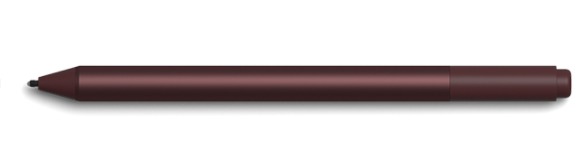
New Surface Pen for Surface Pro 5, with increased levels, tilt, and a rubber eraser
Microsoft has now readied the newSurface Pro 5, which is actually just called the Surface Pro, for release (so I guess it’s time to party like it’s 2013, when the first Surface Pro came out). The new SP is available for preorder. This updated 2-in-1 tablet/laptop has some very interesting offerings for the art crowd.
The biggest difference is the new Surface Pen, which has 4x more levels of pressure sensitivity, making it 4,192, like the new Lenovo Active Pen 2. It also has tilt including shading. It will have the usual button that opens OneNote and other apps. The pen requires an AAAA battery.
This isn’t the Wacom-Microsoft pen we’ve been hearing about (at least, no one has said there’s any Wacom connection is so far). Microsoft is still going with N-trig.
The new pen also still has a rubberish eraser, and hopefully will still have the nib kit with a variety of nibs with different points and textures in a nib kit, like the current Surface Pen.
If the new pen sounds like the Apple Pencil, it underlines how Microsoft sees the iPad Pro as the rival to this version of the Surface Pro. Indeed, the upgraded pen may tilt the scales for artists frustrated with the iPad Pro’s inability to use desktop programs and inefficient file organization.
I’ll have to try out the new pen before knowing if it’s really as sensitive as Apple Pencil. Up to now, I haven’t been that big a fan of the Surface Pen for drawing, but this new one sounds like a different ballgame.
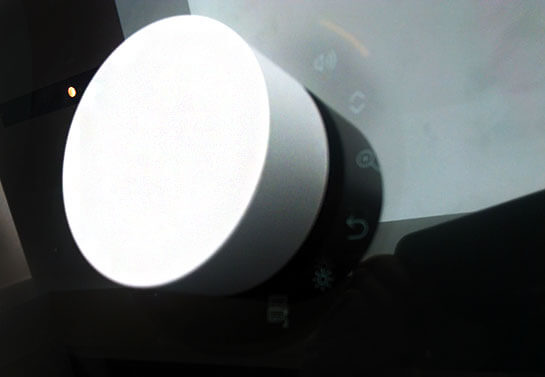
Surface Dial works on Surface Pro 5
Surface Dial
Though the new Surface Pro “5” doesn’t look all that different from the Surface Pro 4, it will also work with the puckish Surface Dial, which brings up an array of on-screen menus aimed at designers.
Now, whether or not the Dial will be of much use on a small screen is hard to say. I’m a believer in the potential of the Dial, but right now it doesn’t seem like a must-have accessory. It makes more sense on the gloriously large Surface Studio.
Surface Pro 4 vs. new Surface Pro 5 2017
The pen is the biggest difference. The old Surface Pen had 1,024 levels and no tilt. This one will have tilt for shading; it’s unclear what else they mean by tilt, since they only mention shading. The Apple Pencil both has angle sensitivity with the tip and shading with the side.
Windows Ink apps include Sketchable, Plumbago, Mental Canvas, Drawboard PDF, and StaffPad. Of course, you can use the pen with any program, including Adobe Creative Cloud.
The pen will have backwards compatibility with all the Surfaces going back to Surface 3, including the Surface Book and Studio. It won’t work on the earlier Surface 2 and original Surface Pro, which were Wacom-penabled. It’s safe to assume it will only deliver previous levels of pressure sensitivity on those.
New Surface hinge makes kickstand more adjustable
Another aspect that’s different and consequential for digital artists is that the attached kickstand will go lower then previous ones. The updated hinge is deeper. The angle is designed to work better for those using the pen. So now the pen use is built into the design.
The new design also has more rounded edges and is “softer,” more Apple-like.
Like its Surface cousins, it comes in configurations of Intel 7th Gen. M3, i5, and i7.
The PixelSense screen of the Surface Pro 2017 is the same size and resolution as the PixelSense SP4–sharp, but not 4K.
The company says the new Surface Pro will get up to 13.5 hours of battery life. That reflects a considerably stronger processor. The processors are now Kaby Lake (7th gen) not Skylake (6th gen). Photoshop rendering and video processing should work faster on this.
The new Surface Pro 5 pen is sold separately, as are the Dial and Type Cover. (The Surface 4 included the Surface Pen.)
The new Surface Pro’s graphics cards will be Intel HD Graphics 615 for the M3, 620 for the i5, and Iris Plus Graphics 640 for the i7. These are next-generation and a bit faster.
The high-res PixelSense screen will be 10-pt. multitouch, 12.3″ diagonal, with a 3:2 aspect ratio, which we like.
The keyboard is upgraded with improved key travel.
Each model will weigh about 1.7 lbs or 766-786g, making it easy to carry around.
Microsoft is talking about how it goes from “laptop” mode to “studio” mode to “tablet” mode.
Apple may be getting nervous about the new Surface Pro 5. On the other hand, perhaps the competition will spur Apple to make a real laptop or even a monitor with an active digitizer.
Microsoft does plan to make a Surface Pro with LTE.
You can see or order the new Surface Pro (5) at Microsoft. Or see/order it on Amazon
Many of us have been waiting anxiously for the Lenovo Active Pen 2 with 4,096 levels of pressure sensitivity to hit the shelves. Shown first at CES along with the Miix 720, the pen was scheduled for Feb. 2017. To this day it remains unseen on U.S. shores. But is it hiding in plain sight?
Lenovo Active Pen “new release”
At a brick and mortar store, I asked about the Active Pen 2, and their system only had the Active Pen, the old one (version 1), same part number.
Lenovo Active Pen “new release”
(photo coming, WordPress uploading not working at the moment!)
But it was marked “new release,” in the store’s online catalogue. This store, which I trust, says that means the item has come out within the past month. Lenovo’s online info about THIS pen now states that it will get 4096 levels on some systems. I purchased the pen with the intention of using it on the Miix 720, but I doubt I will be able to discern the difference between 2048 and 4096 levels.
It’s a Wacom Active ES pen that takes AAAA batteries. It’s for the Miix 510, 520, 700, 720,, and Yoga 900s, but many report it works on the 2nd-gen Lenovo Yoga ThinkPad 14.
(I will have to try it on other AES systems too. They’re not always cross-compatible, even if they seem like they should be. Lenovo is only mentioning the Miixes and 900s as working with this pen, not their myriad other AES tablet PCs.)
The Lenovo Active Pen 2 is mentioned on non-US sites as shipping with the Miix 720, but the Active Pen 2 is not currently mentioned at all on the US site, which says Active Pen 1 on the Miix 720 page.
When I asked Lenovo reps, I was told that they have no idea about any of this, and they’ll get back to me. (It’s not their fault at all–Lenovo is rarely forthcoming with such info).
They did assure me that the Active Pen 2 would not have the same part number as the Active Pen 1, but they did not assure me that the entity known as Lenovo Active Pen 2 would ever be available in the US at all. They also expressed surprise at the “new release” info and asked me what store this was at (it was B&H Photo).
There are some internal Wacom photos of the Active Pen 2 here. It looks pretty much the same as the 1, though the clip may be slightly different, but that doesn’t mean much. The barrel may be a little shorter too (hard to say) but this could be a prototype.
I don’t see definite differences in the photos on the non-US Web sites, as the pen pics are not that close up.
Perhaps there will be two pens in the US, but they will look different but do the same thing, getting the full 4096 levels. Or perhaps those other countries are getting something different-looking or different in some other way, but the one in the US will be like this new release one and do what the 2 does. That would be fine. As with people, its what’s inside that counts.
What’s annoying is the announcement about a Pen 2, then not having any info about it.
Another possibility is that there is wrong info on the Lenovo site or that the “new release” info on the B&H site is wrong and this pen does not really get 4096. It is very difficult to confirm just by testing, as added levels, especially just one jump, are somewhat of a placebo effect.
If the new release Active Pen 1 gets the 4,096 levels on the tablets capable of doing that, it would indicate the pen has had an update. The box says 2048 levels, so it’s backward-compatible that way. Either way, either pen will work on the Miix series and the Yoga 900s.
It certainly is a mystery, but one likely to be resolved in coming weeks. Watch this space.
iLapis creator Giulio de Vita on the vision behind this game-changing device
Giulio De Vita, comics artist and creator of iLapis
The iLapis is a sleeve that you put on a regular graphite pencil to turn it into a capacitive stylus. It has attracted attention from sites from Tom’s Hardware to ProCreate to LaStampa TV. Amazingly, it’s only going to cost a couple of bucks!
Not only that, but lets you use the side to shade and it gets pressure sensitivity via apps sensing its speed. It can be used on any tablet or smartphone screen. I spoke with the creator, well-known Italian comics artist Giulio De Vita, over email, about his vision for this unique and game-changing dream art tool.
Tell me a little about yourself. Who are you, where do you live? Are you an artist? I’m a comic book artist. I’m quite well known in Europe. I worked for mayor publishers since I was 16 years old. But I love to go further comics, I use to work in advertising, cinema, animation, videoclips, theatre.
A real artist never says that it is an artist 😀
Do you usually use a tablet to draw and paint?
I’m a curious guy, and I love to search, try, experiment tools, techniques, artistic languages, media to express my ideas. When digital devices came out, like all creatives, I have been fascinated by these new supports… At the moment I think that they are still too limited to replace traditional artistic tools for fine art, but I’m sure they are a very good tool for standard level. I do not use a tablet for a final art, but I use it for fun, or to make sketches or studies. Paper is still present in my life and I use digital device and paper at the same time.
What inspired you to create the iLapis?
As I use paper and digital device at the same time, I need a unique took to work on both support without changing continuously… As a drawer I tried to sketch on tablet using traditional styluses: they were not precise at all, so I spent lots of money for active capacitive styluses (Adonit, Bamboo, and later Apple Pencil). They were too heavy, fragile, and most of all expensive…
I thought about Steve Jobs when he said that touchscreen are born for the use in mobility that’s why he never wanted to produce a stylus for these device: you can loose it, break it etc…
An expensive stylus is too dangerous to be used in a train, on a beach or at school or in a construction site… For these use you need something resistant, light, that you don’t need to recharge, that is inexpensive, and that if you loose, forgot at home, someone stole it, you can buy another anywhere: in any stationery shop or at a supermarket… even in a lost island in Greece or in small village in Iceland. Like a pencil, but a real pencil.So I started studying if there was a way to let a normal pencil work on digital devices, and, EUREKA! I found it!
iLapis in action
What do you hope to bring to the world with the iLapis?
First, it’s a romantic value, quite philosophic: the idea that an object that most people consider passed, like a pencil, can still say a lot. This can teach us that we shouldn’t give all for granted, because in the specific of iLapis a simple, inexpensive pencil is more innovative and performative than a hyper technologic and hyper expensive stylus.
Second is very important I think not only for artists, but most of all for children, who are more and more focused on digital devices. They can use to keep the confidence of manual use, of the correct way to do traditional handwriting. Think about how important can be this product for playful teaching of writing.
Third thing, is for the pocket of the millions of people using smartphones and tablets in the world. iLapis is not only an excellent writing and drawing tool, but also a very good way to tap and swipe for people who have problems with their fingers (trembling or size, or simply the need to use gloves that make the finger touch impossible) or view.
What kind of challenges did you face in creating it?
The jungle of the patents’ bureaucratic procedures.
Is it difficult to get an item like this onto the market?
I think it’s difficult, because it’s new in some way, because it changes the perception of the capacitive stylus not more like a digital tool, but like a simple stationery tool. People thinks it’s a chinoiserie or a trick for its simplicity and low cost.
Is the iLapis your first product creation?
Yes, I used to customize artistic tools for my needs, but of course they were too specific to justify a production. I remember that some years ago I had fun to make a publishing project about impossible funny inventions (like the pillow that combs you while you sleep :-D) where maybe the idea of becoming an inventor has grown in my mind.
How does it work?
It’s really simple: it’s a transparent conductive film that you apply, through a grip, on the tip of the pencil to enlarge the surface of contact of the pencil to the touchscreen. The device detects this contact, like it was a finger, as the graphite of the pencil is a very good conductor like the human body.
You said you can use it with Apple Pencil. What happens?
That’s what I discovered recently: Apple Pencil works exclusively on iPad Pro, But if you apply iLapis on it you transform it in a universal capacitive stylus, so you can use it on any brand of touchscreen, size and model.
Does the iLapis work differently on iPad and iPad Pro? Does it get pressure sensitivity on iPad Pro?
iLapis has no battery, has no electronics parts, has no wifi or bluetooth connection: that’s what makes it different! (it’s nice to think that I “thought different” from Apple :-)) iLapis is the most precise capacitive passive stylus and the finest tip between all capacitive styluses (even actives), the one working at higher inclinations, the only one working on paper and touchscreen with the same tip
iLapis works the same way on any brand and model or touchscreen. It has no pressure-sensitive system, but drawing apps detect the speed of the gesture and interpret it as pressure with excellent result: I think that’s enough for a 5€ product instead of 100€ 😉
Tell me about your partnership with Perpetua. Perpetua is the only pencil 100% made Italy (it’s incredible for the country of Leonardo, Michaelangelo, Caravaggio and Giotto) with recycled graphite, ecological because made without wood, that draws underwater, that does not break when it falls, and that has been chosen for its values by G7 presidency as official gift for international delegations for the 2017 G7 summit that will be placed in Italy in May.
When I started the Kickstarter campaign I was contacted by Susanna Martucci, the brilliant inventor and entrepreneur of Perpetua, who saw many things in common of our stories and our products, and told me that we have to be partner. I’m very pleased of that, and I think we’ll make a long way together.
Does the iLapis work only with a pencil, not other drawing tools? It works on any tool made in a material that is conductive.
Can you put it on a finger and use it? How about a stick?
Yes but I can’t see the utility of this, as iLapis is designed to use a fine tip on a touchscreen, and not a large finger 😀
Is it something like Lenovo AnyPen that works with a banana but not with things made fully of plastic?
I think that Lenovo AnyPen has an hardware and operative system that let the touchscreen to detect smaller contact surface than other touchscreen. It gives a different solution to the same need of iLapis: to use any pencil on a touchscreen. iLapis is the solution for any other touchscreen.
Does the line get the texture of a pencil?
It depends on the app you use: you use a pencil, but the device read it as a normal stylus: through the app you can obviously chose any tool (pencil, pen, brush, eraser …) and colors (white, green, red, blue etc…) sharpness , opacity, dimension…
If you use a colored pencil, would you get a black line or a color line? A colored pencil doesn’t work on iLapis, because inside the colored pencil there is no graphite but pigments that are not conductive.
Does it matter how sharp the point is? No.
Can you use it with a mechanical pencil, made of metal or plastic? Yes, you need to have enough graphite inside the mine: if the mine is too thin (0,3mm; 0,5mm; 0,7mm; 0,9mm; 1,4mm) there is not enough capacitance to be detected by the device, if you have a large mine mechanical pencil it works good.
What drawing apps do you prefer to use with it?
My favorite are Procreate, Pen & Ink, Pencil, Sketches, Penultimate and Notesplus.
What tablets does it work on? Does it work on Android tablets? What about phones? Touchscreens on laptops?
It works on any capacitive touch screens, of course it depends of the quality of the touchscreen and their apps. It works on trackpads too even if it make no sense to use it this way 😀
What will it cost?
The final price should be between 2,5 to 5 dollars, but it depends of conditions of distributions. anyway drastically cheaper than any other stylus.
Where and when can I buy one?
The Kickstarter campaign has just finished and unfortunately it has not be funded. Apparently it’s not a good sign, but I’m very happy about the result of the campaign. First of all I put a high goal of 33000€, that’s because I have to patent worldwide the idea and to set a mass production, and find a distributor.
That’s what I can’t do alone, and I need to find a partner to do that, I’ve never been intentioned to make handcrafted products. I want to do it seriously, because I believe in the product. Of course the mass of people out there doesn’t care a lot about the project, and care about the product.
The result of 7400€ is very good, and what’s more important for me is the big interest of the press about iLapis, and the enthusiasm of people talking about it on the web… thats a really important approval rating for a product.
Now my concept is real and can be developed in a product. I hope very soon, with some improvements that I had in mind since the launch of the campaign.
What are your next steps, do you have more ideas for new creations or for the iLapis?
Next steps are to design a product that can be produced compatibly with Perpetua’s values (recycled material and 100% made in Italy) and then find a good distributor. Thanks very much and congratulations on the iLapis!
Thank you for your interest.