I'm an author and illustrator who has used drawing tablets since the early days. I love how flexible and forgiving they make everything. I'm also fascinated by the technology. I started this site to bring knowledge to everyone. I want this to be the only place you need to go to learn about drawing tablets.
Art on the go: MDAC.org Mobile Digital Art & Creativity Summit held in Silicon Valley
by Vicky Rubin
Poster done in ArtRage mobile painting app
MDAC, Mobile Digital Art & Creativity, an annual conference for digital artists who work on mobile, had its 2017 summit this month Mountain View, California, deep in the heart of Silicon Valley.
There was so much going on it was hard to take it all in–from a fascinating landscape class to a talk about drawing people from life while riding the train, to a fun, in-depth figure drawing on iPad, to animation and multimedia workshop, to learning apps such as Steller, to character design to printing. There was also a projected video art show celebrating the cultural diversity of Silicon Valley.
It was the 5th such conference. I went, had a great time, and learned a ton–there were so many programs and speakers that the two days went by faster than it takes to open an app.
The event kicked off with an art opening at the Pacific Art League of Palo Alto. Artworks were fine art paintings and photos.
These artists have made the most of this emerging medium. There were abstract, figurative, collage, landscape, you name it, under the categories of Painting, Photo, and Photo Art. Check out the winners on the MDAC site, mdac.org.
Digital artworks on display
All the art was created on iPads and Android or Surface tablets, or smartphones.
MIcrosoft was there with its Hololens, giving a demonstration. There were also developers from Procreate, ArtRage, Paper 53, and iOrnament, and an ArtRage artist doing live painting.
Online streaming digital art conference Sept. 16-17, 2017
But if you don’t happen to be in the Bay Area, it’s not too late. You can register for the online streaming conference on Sept. 16-17, 2017, where you’ll enjoy much of the same program as the in-person conference. Here’s the registration page.
You can also check out mobile art classes given by MDAC people at mobiart.how.
The art exhibit was followed by two action-packed days in Mountain View of conferences, talks, and classes.
Keynote speaker Daniel Leighton, an artist/filmmaker/programmer who was born with Crohn’s disease. He showed how his expressive paintings got another level of meaning when combined with Augmented Reality.
Keynote speaker Dan Ayoub from Microsoft talked about creatives can empower themselves with AI and Mixed Reality. Microsoft is including free software with the new Creator Update that will even allow kids to incorporate 3D into home movies using the Story Remix app.
There were live workshops in painting landscape, figure, and portraits. It seemed like most participants used iPad Pros.
One takeaway for me was how much apps are taking the place of what once were complex operations, such as animation. Whereas making a simple GIF was always pretty easy, making timelines and multiple layers was not. Easily mixing 3D into video is a really big step as well–it’s so simple that kids can do it. While most digital art is used for illustration and concept art, its use in fine art can be a revelation.
If you haven’t gotten an iPad Pro yet, you’re just in time to get the second-generation one, which has some definite advantages for artists over the first. The lineup sees the 9.7-inch model replaced with a larger 10.5-inch version. The 12.9 inch iPad Pro 2017 size remains the same.
Both have updated displays, a brand new chip, new cameras, and other improvements. The 10.5″ iPad Pro 2017 has 4GB RAM compared to the 2GB of the 9.7.”
The cameras match the iPhone 7, which is a pretty big deal. In the past, iPads were way behind iPhones in photo quality.
iPad Pro 10.5″
Better color
Both have a wide gamut DCI-P3 display, something the old 12.9″ inch model lacked, offering only sRGB. P3 is the same system used in digital cinema. It’s similar to Adobe RGB, though with fewer greens, and it’s an improvement over sRGB. Both new models’ screens shine at a very bright 600 nits. The 9.7″ iPad Pro had two color gamuts, including P3.
Both models now also have True Tone, which first appeared with the previous 9.7″. TrueTone detects ambient light, letting the iPad change the color of the display to look best with its surroundings.
The screens are each topped with two coatings, anti-reflection and fingerprint-resistant. Less than 1.8 percent of light gets reflected, making it easier to see in sunny or bright areas. Of course, the visibility depends how bright you keep your screen.
Size and borders
The larger dimensions of the 10.5″ now allows for a full-size on-screen keyboard, as well as a full-size layout for the optional Smart Keyboard accessory. And 10.5″ is bigger than it sounds when it comes to screen real estate than 9.7.” 10.5″ is a better size for drawing than 9.7″. (I like the 12.9″ one more, but it’s a bit less easy to throw into any old bag).
The 10.5-inch model’s borders are 40% smaller than the older 9.7’s, with the tablet still weighing just over a pound. The 12.9-inch iPad Pro’s borders are the same size as the original’s. This new model has a Wi-Fi and cellular version, supporting 802.11ac Wi-Fi and LTE Advanced, a boon for digital nomads. The 12.9 weighs a mere pound and a half. Both new iPad Pros have Retina displays with a pixel density of 264ppi, which hasn’t changed from previous iterations.
ProMotion means less laggy Apple Pencil
Apple’s new ProMotion technology is enables a refresh rate of up to 120Hz, double the previous models. So drawing with the Apple Pencil is now smoother with faster tracking, cutting down latency to 20 milliseconds, while also saving power by adapting the refresh rate to match what’s viewed on the screen.
Faster graphics performance
The new models sport the A10X Fusion processor, consisting of a 64-bit six-core CPU along with a 12-core GPU with an M10 coprocessor also embedded. The company says the A10X has up to a 30 percent faster CPU and 40 percent faster graphics compared to the A9X chip. You can edit 4K video or render a 3D model quickly. While the A9X chip approached a laptop in processing power, the A10X beats out some.
iOS 11
The upcoming iOS 11 should bring welcome changes to file management and multitasking. It will become more like a Samsung Android tablet. There will be a file explorer and drag-and-drop features. (You’ll be able to put iOS11 on your older iPad Pro and some of the older non-Pros). The new operating system will being major changes and bring out the potential of the iPad Pro 2017 for artists.
Conclusion
The changes are significant, so if you’re in the market for a new tablet anyway, Apple is now doing even more to keep creatives in its ecosystem.The faster chip means you can do more with 3D and video. Art apps, especially those that let you mix colors, such as Paper by 53, will benefit from greater color accuracy.
The older iPad Pros are still fine, especially if drawing and sketching is your main interest. You’ll still be app-dependent, so if you want to run full Photoshop, you’ll need a laptop or desktop. But with mobile apps getting more and more powerful, you might start leaving your laptop at home.
See more info and reviews of the 2017 iPad Pro (Amazon)
Cheap tablet PC for drawing in 2017? Acer Spin 1 and Lenovo Miix 320 fill the bill
Are you looking for a lightweight, powerful, low-cost digital-sketchbook with a pressure-sensitive pen that runs Windows? Now, a cheap tablet PC for drawing and general use can be had.
These affordable tablet PCs in 2017 are filling the recent void. Both have active pen support and use Windows Ink to keep you inking happily. These are perfect for commuting, taking to class, or backpacking.
These two art-capable PCs are actually both economical and decent. Usually, a cheap tablet PC has a low-res display, but these both have HD. Don’t expect these to become your main computers, unless your demands are not that high.
Lenovo Miix 320
Lenovo Miix 320. Photo courtesy Lenovo
Lenovo is aiming this at “millennials” who have “side hustles”–well, they’ve gotta have an angle. The Miix 320 is for anyone who wants a low-priced Windows tablet with active pen support, via the optional Lenovo Active Pen. The PC is a 2-in-1 detachable with a full keyboard,
While it’s not ideal for professional or resource-intensive use, since it’s not that powerful, you can still do a lot on it.
The Miix 320 has an Atom x5 Cherry Trail processor, Intel HD graphics, up to 128 GB storage, and full FHD touchscreen.
It’s nice and light–the tablet sans keyboard weighs just 1.2 lbs (550g), and 2.25 lbs (1.02 kg) with the keyboard attached.
The Miix 320’s battery life is up to 10 hours, only 17.5 mm thick. Dolby speakers pump up the volume.
This package is petite at 9.8 x 7″ (249 X 178 mm) and only .68″ (17.5 mm) thick. So you can easily put this in a backpack or small travel bag.
It’s got Windows Hello login capabilities and comes in Platinum Silver and Snow White.
The Acer Spin 1 has been updated and is coming out July 2017. It’s still a really affordable convertible notebook that takes the Acer Active pen, which has a Synaptics digitizer. This new and improved Spin 1 has an all-metal chassis unusual in this budget category, and has a full HD display.
Its processor is Intel Pentium or Intel Celeron. Weight is 2.76 lbs or 1.25 kg, not that extremely light, but tablet PCs do tend to be heavier because of the digitizer layer. It’s thin at .55 in. (14mm) and has 4G DDR3 memory. RAM options are 32, 64, or 128 3MMC storage. IT has antimicrobial Gorilla Glass 5, with embedded ionic silver to slay germs forever.
It’s full size at 11.6″, not a mini computer. Its battery life is not bad, up to 10 hours. It can be posed in laptop, tent, display, or tablet modes, with the wide-view IPS screen offering 178-degree viewing angles.
Notably, its precision touchpad supports Windows 10 gestures. This kind of touchpad is usually found on much pricier devices, such as the Surface Pro.
You can turn on a Bluelight shield, which will make the screen look pinkish, but save your eyes and melatonin.
It’s also got fast Intel Wireless-AC. Its ports are Bluetooth 4.0, a USB 3.1, a USB 2.0, and HDMI, and a microSD card slot.
OK, it’s a cheap tablet PC, so it’s not the fastest, nor does it have the best keyboard. But it has its good qualities for art. Best for students and sketchers.
Because these are not that powerful, I don’t suggest running full Photoshop on them. Though you can put it on, chances are it will lag if you try to do much. So use smaller apps such as ArtRage, Sketchbook Pro, Photoshop Elements, or Windows mobile apps like Fresh Paint or Sketchable.
See also See also Mytrix/Cube i7 review, a cheap tablet PC for artists
Best tablet PC for drawing: laptops and 2-in-1s for artists in 2017
What’s the best tablet PC for drawing? Here’s what to look for:
The best tablet PC for digital artists has power, portability, and a great display. The very top have a dGPU to give Photoshop filters a boost–not a necessity for all artists.
All these computers are great for drawing directly onto the screen, as well as note-taking and photo editing. And they’re portable to boot. All have an active pen that lets you draw naturally with state-of-the-art digitizers including Wacom, N-trig, and Synaptics.
Best of all, a lot of these tablet PCs for drawing have 15 and 16″ displays–a generous canvas area just makes drawing so much easier.
Some are powerful enough for video editing. A lot of these are not just the best 2-in-1s for art, but the best tablet PC for general use, productivity, students, and professionals from all walks of life.
To make it easier, links open in the Amazon store in or near the country you’re in.
Here are our picks for the top ten tablet PCs for artists in 2017:
Wacom MobileStudio Pro
Wacom MobileStudio Pro
Who wouldn’t want one of these? With its buttery-smooth patented Wacom EMR digitizer and generous sizes of 13 and 16, the MobileStudio Pro tops our list in drool-worthy tablet PCs for drawing. The 16 has an option with a 3D camera/scanner and NVIDIA graphics. With its chrome Express Keys, quiet fan, and Pro Pen 2 with 8,192 levels, there’s a lot to work with.
With the optional Wacom Link, you can hook it up to a Mac or PC and use it as a Cintiq. It gets 95% of the Adobe RGB color gamut, making it a great tablet PC for photo editing as well as art. This is certainly a best tablet PC for Photoshop. Runs WIndows 10.
The Lenovo Yoga 720 goes where no convertible laptop has gone before–it has a dGPU and works with the Lenovo Active Pen, a Wacom pen with 4096 levels. It’s a convertible laptop that folds into 4 positions. That means the keyboard doesn’t detach, making it an excellent all-around productivity machine as well as art device. Tablet mode makes it easy to draw on, though you won’t be able to access the keyboard in this mode. Windows 10 is the operating system. The Active Pen is responsive and accurate.
You might think of this model as the Surface Pro 5. The new Surface Pro’s pen has 4,096 levels of pressure sensitivity as well as tilt, and lets you shade with the side. The pen is sold separately. The keyboard is covered in Alcantara, a fabric that’s easy to clean and gives you a nice soft place to rest your mitts. The PixelSense display is crystal clear.
If you want a GPU, though, you’ll have to get the Surface Book, which has that option. The Book is “laptop first,” with a metal keyboard that detaches. Its battery life is not as long as the Pro.
The Vaio Z Canvas has integrated graphics, but its Intel Iris Pro Graphics 5200 graphics is as powerful as a dGPU. This little tablet is a mobile workstation on which you can edit video. It has an N-trig pen with 1,024 levels, and you can also use a Surface Pen on it, though don’t count on getting more than 1,024. The number of levels don’t matter a whole lot.
The Vaio Z Canvas has some nifty art-centric features. The keyboard does not attach but connects via RF. The Z Canvas has a 12.3″ screen and has a 3:2 aspect ratio, which is valuable for drawing. The display gets 95% of the Adobe color gamut, making it a best tablet PC for photographers as well as for drawing. There are on-screen controls aimed at artists, and you can map it to multiple monitors.
The Vaio Z Flip is similar, with an attached keyboard, and is also an excellent detachable PC for drawing.
The Lenovo Miix 720 lacks a dGPU, but is a nice all-around detachable that also takes the Lenovo Active Pen. It has frequently been compared to the Surface Pro 4 specs-wise, but has the Wacom pen. It has a QHD screen that’s a sunny 400 nits. Lenovo has a wide variety of Miixes with active pens. It’s a pick for the best tablet PC for drawing.
Though it’s a little older, the 1st gen ThinkPad Yoga 14 is still around and has NVIDIA graphics.
Dell XPS 13 2-in-1
Dell XPS 13 2-in-1
Super skinny convertible laptop has the Dell Active Pen, which uses Wacom ES. This Dell won an innovation award at CES. Though its processor is not quite as strong as the Dell XPS that’s lacking a pen, it still has plenty of power. (That other Dell rivals the MacBook Pro but has no active pen; this is one is not quite as fast.)
It’s light and portable. Its Infinity Edge screen is nearly bezel-less. The pen gets 4096 levels. There are both HD and higher-res UHD display options, at a bright 400 nits.. The keyboard doesn’t detach, but you can fold it all the way back.
With an i7 processor and Wacom EMR. Samsung has created a powerful all-around notebook. It has imported Air Control from its Android tablet–a radial menu that can be controlled with the S Pen. The included S Pen now rocks 4096 levels of pressure and gets tilt in certain apps.
A big 15.6″ or 13.3″ display, 4K UHD (3840×2160) with a bright 350 nits, SSD, realtime HDR, HDMI, USB 2.0 and USB-C and a lock port all conspire to make this one a keeper.
It’s a bit weighty at 4.5 lbs. and the battery isn’t the longest at 6.5 hours, but for a 15.6″ screen I can live with that. This is one of the more powerful of the Samsung tablet PC lineup.
The Asus Transformer T304UA is a powerful detachable PC with an included Synaptics pen.
There’s an i7 processor with a 256GB SSD and 8GB Ram. Battery life goes to 8 hours. With the keyboard attached, it still weighs under 2 lbs and is super thin at .3″. The 2164 x 1440 FHD resolution is decent.
One notable feature that makes this a good tablet PC for artists is that the display covers the full RGB color gamut. The Asus has a Windows 10 touch login with fingerprint sensor and Windows Hello. The included keyboard is backlit.
The only drawback is its Synaptics pen, which is a bit less accurate for drawing than its competitors such as Lenovo, which uses Wacom, and Microsoft’s N-trig pen.
(no longer around)
HP Spectre 360 15
HP Spectre 360
Convertible ultrabook with 360-degree display comes in 13″ and 15.6″. This powerful convertible tablet PC touts 16 hours of battery life. It’s got a 4K display, Thunderbolt, NVIDIA graphics, over 12 hours of battery life, and Bang & Olufsen speakers. There’s also a far more affordable model without so much power, but still not bad. A really nice-looking, light, and powerful Windows device. However, its Synaptics pen is just a bit less accurate than Wacom and Microsoft’s pens.
Apple iPad Pro
iPad Pro 12.9″ with Apple Pencil
While you may not see Apple as a tablet PC, in fact its A9X processor with 12 graphics cores is as powerful in some ways as one. So I think it deserves a place here. It doesn’t run desktop apps, but apps like Procreate and Medibang offer a lot of the features of Photoshop, including the ability to create brushes, use lots of layers, high-res files, 3D, and your favorite filters.
With the Astropad App, you can use the iPad Pro and Apple Pencil as a wireless Cintiq-like input device with your Mac.
The new iPad Pro for 2017 even has a Windows-like File Explorer, so you’ll be able to find your stuff. Runs iOS.
We like the bigger, 12.9″ iPad Pro for drawing. Its 3:2 aspect ratio is like a sheet of paper.
The Lenovo Yoga 720 2-in-1 goes where no convertible tablet PC has gone before. It combines a pen that gets 4,096 levels of pressure sensitivity with a 4K screen and NVIDIA graphics. This noteworthy hybrid is more proof that Lenovo is forging ahead with innovative art devices. The Yoga 720 tops the Yoga 710, which also had the dGPU.
Type of tablet
Convertible hybrid laptop (nondetachable)
Digitizer: Wacom ES, 4096 levels of pressure
Pen: Lenovo Active Pen 2 or any pen that works on Wacom ES
Features
360 degree “flip-and-fold” design
Models go from 13.3″ to 15.6″ HD screen (1920×1080) to UHD (4K0 screens, i5 to i7, 256GB to 1TB storage, Intel HD Graphics 620 to NVIDIA GeForce GTX 1050 2GB
15.6″ weight starts at 4.41 lbs (2kg)
13.3″ weight 2.9 lbs.
.07″ wide
Two USB Type-C with Thunderbolt
The higher-end one has micro HDMI and an SD card reader.
13″ model comes in Platinum Silver, Iron Grey, and Copper. The 15″ comes in Iron Grey and Silver.
Lenovo states that on the models with the NVIDIA GTX 1050 card, you can edit photos, play advanced games, and render multiple videos at once.
The HD versions have 8GB RAM and the 3840×2160 4K models have 16. The memory is upgradeable if you DIY.
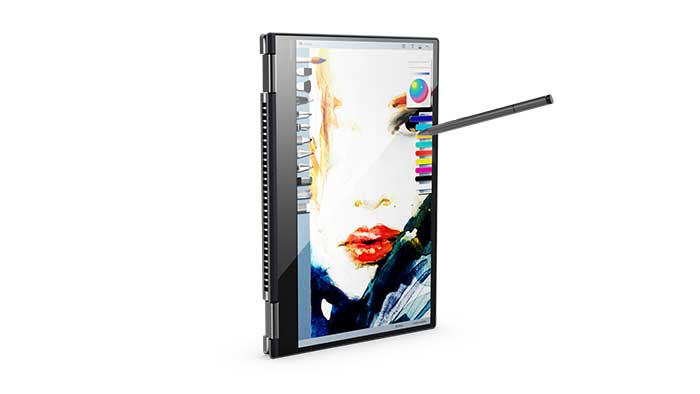
The Yoga in all its poses.This is the 13″ mode.
At the bottom of the post is a downloadable spec sheet with more detail.
The Lenovo Yoga 720 (YOGA 7200 151KB) has up to the latest Intel Core i7 Kaby Lake processors. The 15″ Yoga 720 at the moment is the fastest in its class, which is convertible laptops. Like many Lenovo products, there’s a dizzying array of configurations, so I’m summarizing them here rather than writing each one out.
The highest-powered and largest one will probably excite digital artists the most. That would be the one that’s 15″ and has discrete NVIDIA graphics, suitable for rendering Photoshop filters and for gaming.
The fact that you can add your own memory is a plus. Many PC hybrid laptops have the memory soldered in and don’t let you upgrade.
The fast processor also lets you boot up quickly.
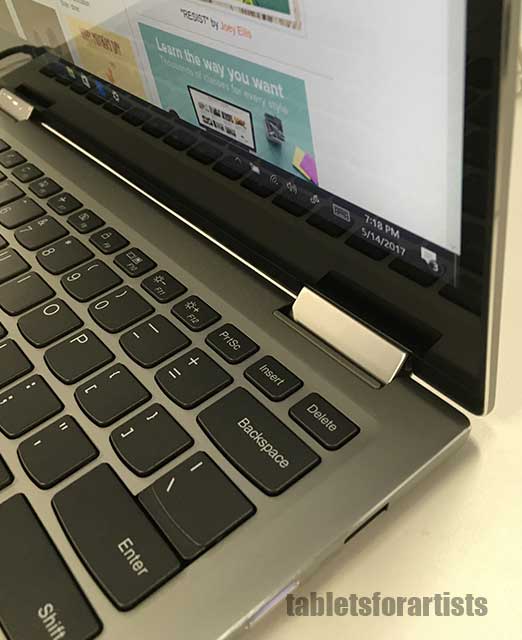
Unlike some thinner and less powerful ultraportables, this laptop does have fans, and it can run warm. The vents are in the back.
Yoga 720 vs. Yoga 520
The Lenovo Yoga 520 is a more entry-level option with only has Intel i3 and 15 and HD. It has a 14″ screen that also has the Wacom digitizer. It also has the option of the NVIDIA GeForce 940 MX graphics card. It’s a good even more affordable option if you’re not a power user; you can use Photoshop and other Adobe software on the i5, and on the i3 too but we suggest the i5 if you’re going to get the Yoga 520. The 520 will be for sale in July 2017.
Want a detachable instead? Try the Miix 720
If you’re looking for a powerful detachable, the Lenovo Miix 720 is not quite as strong as the Yoga 720 but it does let you take off the keyboard.
Pen and drawing
The Active Pen 2 isn’t available yet, but the Active Pen 1 is smooth and accurate.
The Yoga 720 and 520 work with the not-yet-shipping Pen 2 or with any Wacom ES pen, so it won’t be difficult to find a pen. Some product info says the “new release” Active Pen 1 is capable of getting the whole 4096.
Though Wacom ES is lower resolution than EMR, there’s practically zero parallax (distance from pen to line). The pressure sensitivity and palm rejection work well, and I can’t tell the difference between 2048 and 4096. The Lenovo Active Pens do not have tilt sensitivity.
A 15″ surface is a great size for drawing, and there are few portable tablet PCs around this size, besides an older Dell Inspiron 7568 and the MobileStudio Pro 16 by Wacom. The 13″ screen is a good drawing size, too. The Yoga 520 has a 14″ screen.
When the computer is in tablet mode the keyboard will be facing the surface but will be recessed. The keyboard will be disabled, so you can’t use keyboard shortcuts. The clamshell design does let you open the laptop up flat, so you could keep it open.
Portability
The larger, 4.4 lbs. model of the 720 is pretty good for a 15″ screen. You should carry a sleeve to keep the pen in, as there’s no silo. The 13″, at 2.9 lbs, is not the lightest laptop, but still carryable. Since it’s a clamshell, there’s more protection than you’d find in something with a soft keyboard such as the Surface Pro 4.
Screen
The IPS screen is antiglare but still glossy. Viewing angles are pretty good.
Brightness-wise, at about 280-300 nits it’s bright enough, but colors are not as vibrant as some laptops, but it’s not bad.
This nondetachable laptop has a 360-degree hinge, letting you bend the Yoga to poses of laptop, stand, tent, and tablet. “360 degrees” may sound like you can also rotate the screen; you can’t. It bends on hinges, like other Lenovo Yogas.
The screen gets over 100% of sRGB, better than most laptops, but it’s not wide gamut, so those who need Adobe RGB coverage will have to look elsewhere.
Design
The large lower bezel on the bottom is an odd design touch but I think it’s to make it easier to pick up the device in tablet mode without getting fingerprints on it. The other 3 sides have a very thin bezel. Designwise, the Yoga 720 doesn’t stand out. It doesn’t have the distinctive watchband hinge of some Yogas. One cool thing is the fingerprint reader to the right of the trackpad.
Keyboard
The island-style keyboard has keys with key travel not as high as the most comfortable keys, which are deeper, but the keys are fine. They are about 1.2 mm, and I prefer to type on 1.4, yet 1.2 is OK. The keyboard is full-size and backlit. Since the keys are recessed when the laptop is in tablet mode it makes sense for them not to be taller.
Yoga 720 keyboard and hinge
Pros
value
13″ and 15″
NVIDIA card option
up to 4096 levels of pressure (depending on pen)
4K option
can use any Wacom ES pen
choice of colors
127% of sRGB
boots quickly
Cons
Not amazing battery life
USB ports only USB-3, may be a difficulty for some users
colors not super-vibrant
no Adobe RGB
some fan noise
Battery Life
Lenovo claims 9 hours battery life for the HD and 8 for the UHD (4k), but this would depend a lot on use. A 4k screen and graphics rendering is going to take up more power and drain the power faster.
User Lenovo Yoga 720 reviews
Lenovo Yoga 720 reviews have been positive, though the product is still new.
The lower-spec model is OK too, but without the dGPU it doesn’t differentiate itself a lot from others in the same category.
The lack of Adobe RGB may be a sticking point for some.
The verdict
This is not the fanciest-looking tablet PC, but the one with NVIDIA is high-performance. Lenovo is not not adding a premium to the price for the art capabilities. The specs of the higher -end model compete with the Wacom MobileStudio Pro, which of course has more specialized art features. The 720 is a good value for a powerful art PC.
The large size alone is enough reason to appreciate this release. It fills a gap that’s been missing since the Lenovo ThinkPad Yoga 14 1st gen, namely that of discrete graphics. This Lenovo Yoga 720 review is a thumbs-up, and we’re adding it to our top list of tablet PCs because of its dGPU and Wacom pen.